 SwitchLog
Your MacBook becomes the AI editor · $0 in credits
Just shoot. Leave the editing running.
Drop in hours of footage and the finished video and its shorts are made while you rest or film the next one: the highlights picked, the cut, captions, sounds and music. The AI runs on your Mac, so it costs nothing extra.
- 1h 41m stream → 24 min video + 55 s short
- $0 in AI fees or credits
- Pro $19.99/mo, unlimited
- Free until you export, no account
The time editing takes
One 10-minute video takes a person days.
Watching the footage again, picking what stays, cutting, writing captions, pulling shorts. SwitchLog makes that draft with nobody at the keyboard.
what video editors said one 10-minute video takes to edit
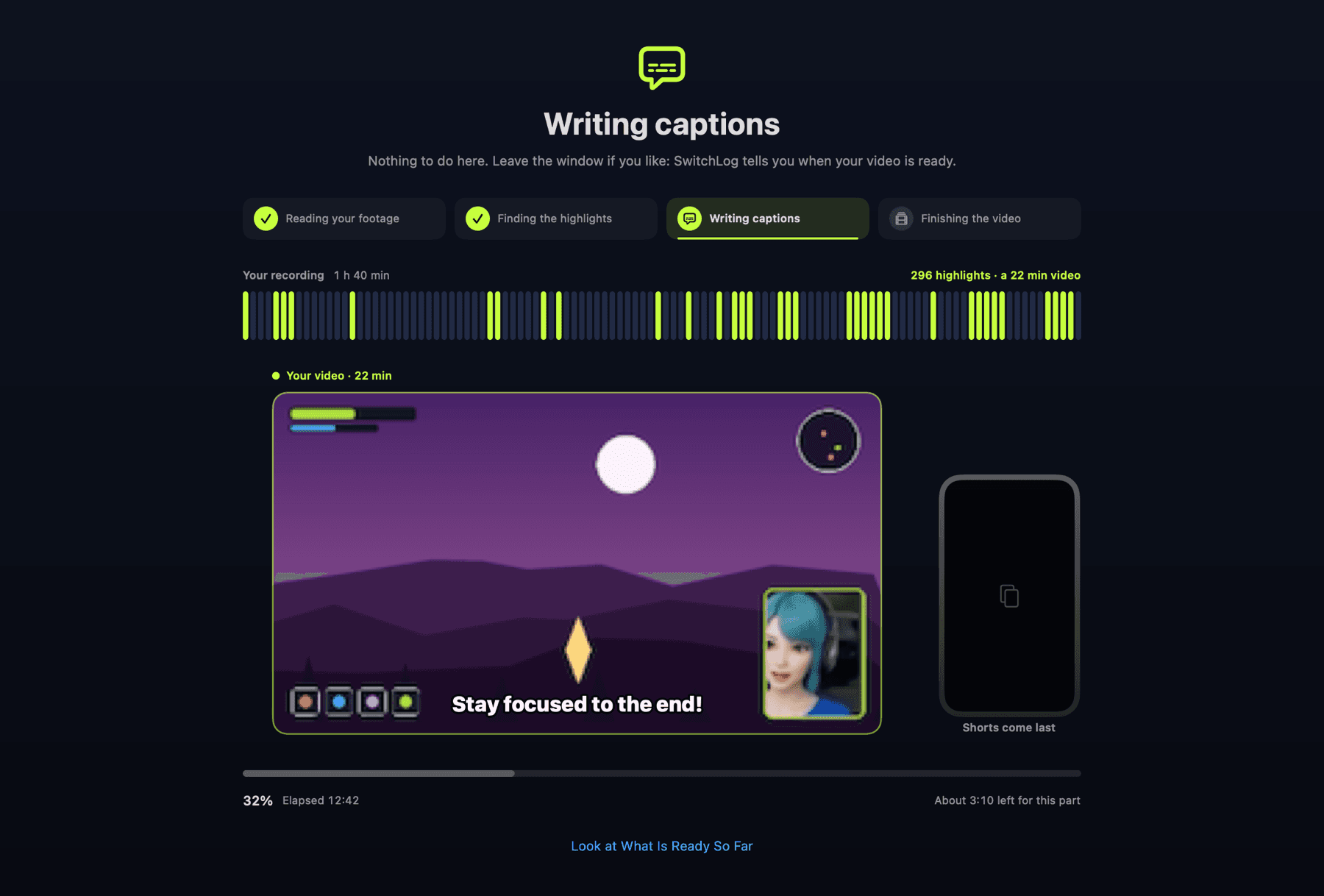
for 52 min 5 s of footage, with nobody touching it. It gave one long-form video and 8 suggested shorts
What SwitchLog does in that time
- Watches and listens to the whole recordingautomatic
- Picks the moments to keepautomatic
- Cuts the stretches and joins themautomatic
- Separates the voice and writes the captionsautomatic
- Sets the caption lookautomatic
- Picks the shorts and reframes themautomatic
- Adds sounds and musicautomatic
The figure for a person is what respondents said in a survey of 285 YouTube video editors in Korea (Hanbit Media Labor Rights Center, published December 2023). SwitchLog's is one gaming recording run once, on 2026-10-05. The time spent changing the draft differs by video and has not been measured. Read the report on the survey ↗
What happens while you are away
From hours of dull footage to a video worth watching.
It watches and listens, picks the moments to keep, cuts them in order and adds captions, sound effects and music. Then it lines up the shorts each video can give.
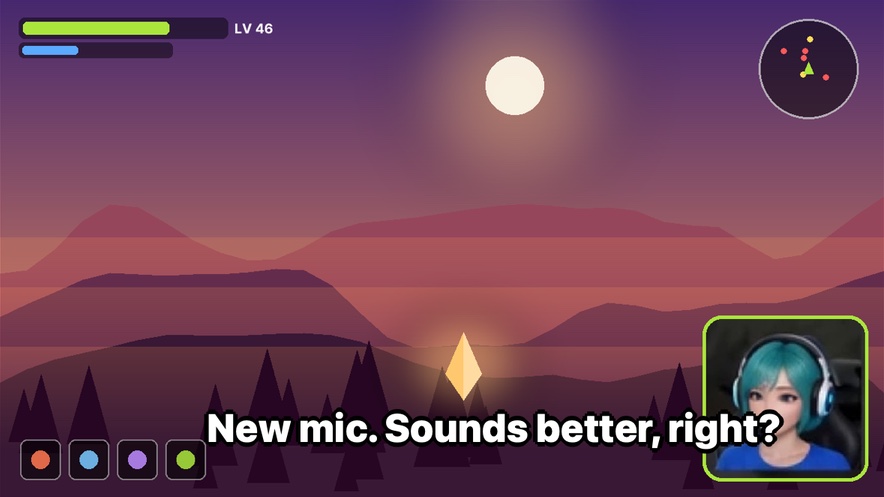
- Captions
- Sound FX
- Music
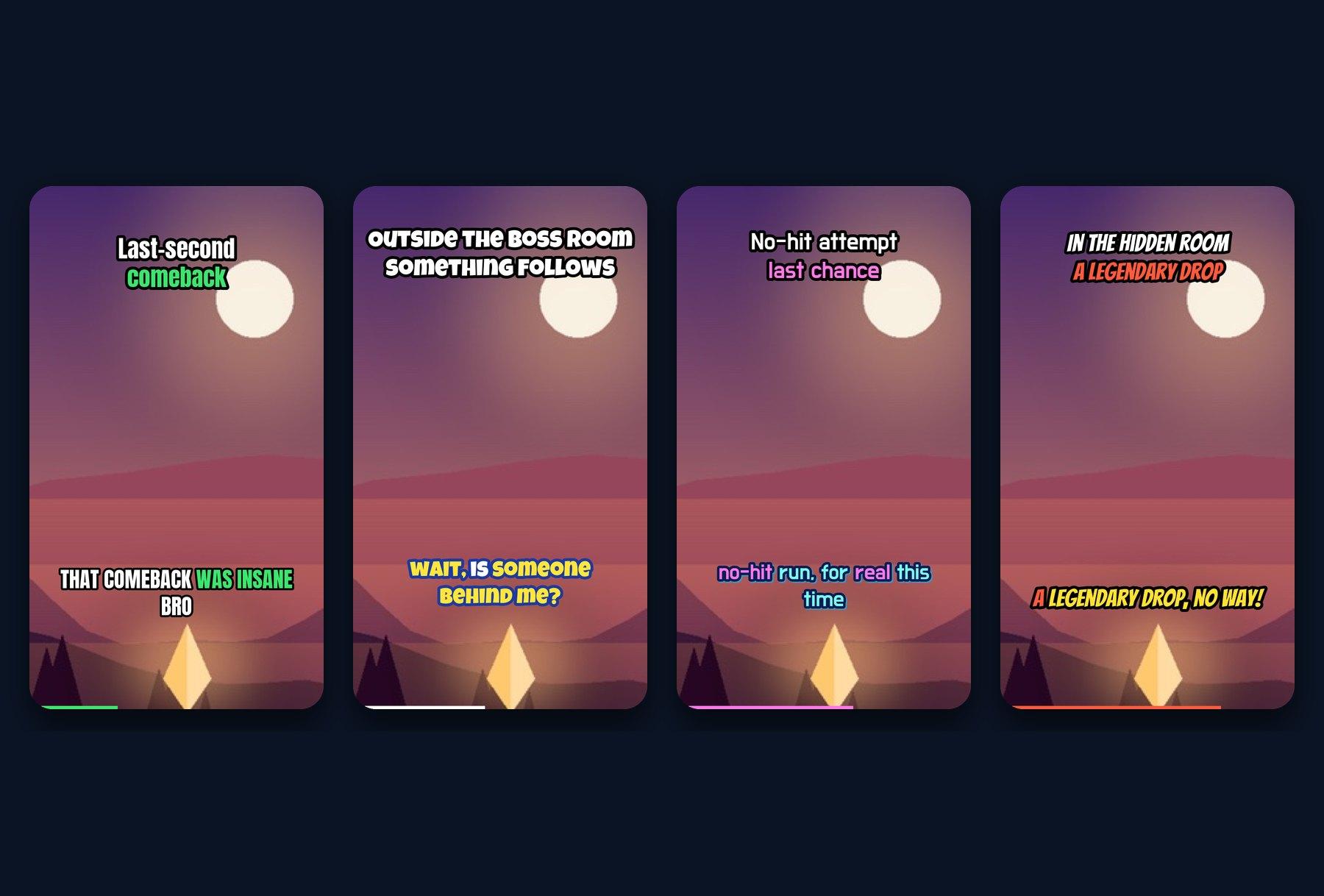
 Last-second comeback

New mic. Sounds better, right?
Short 55 sReal runs
What one press actually produced
Real projects finished from footage we shot ourselves. Hours of raw footage became a video of a few dozen minutes, in one press.
- Travel, one day7h 39mRaw footage1h 13mFinished cut
- Mukbang2h 38mRaw footage21 minFinished cut
- Gaming stream1h 41mRaw footage24 minFinished cut
Lengths and counts measured on 2026-09-25 on an Apple silicon Mac. How we measure edit quality is published separately. How we measure →
When you come back
One stream. Several videos. Then the shorts.
A long stream holds more than one video: a round, a talk topic, a meal. SwitchLog finds them, marks the ones it would make first, and suggests the shorts each one could give. You pick; it makes them.
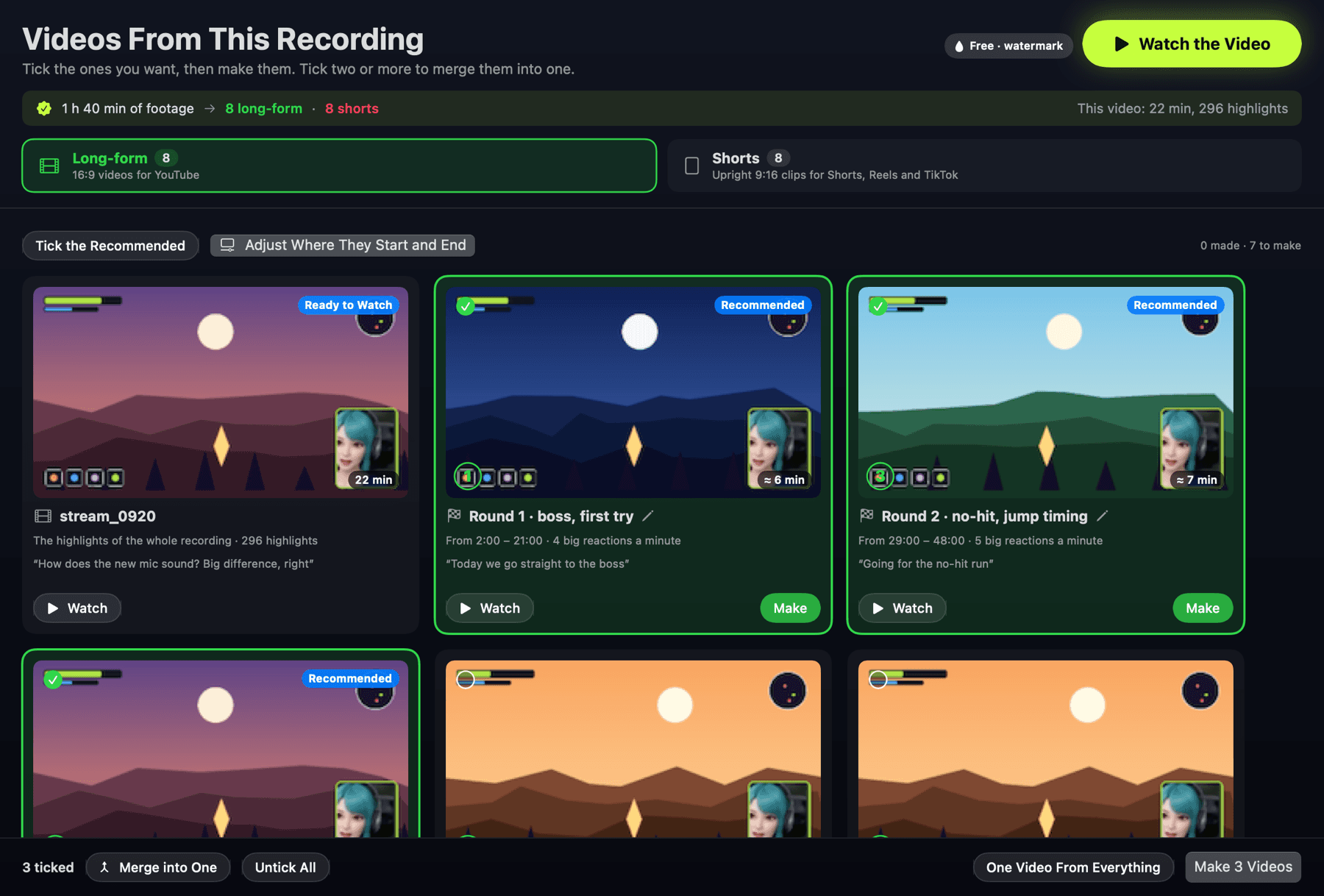
Everything the recording gives, on one board
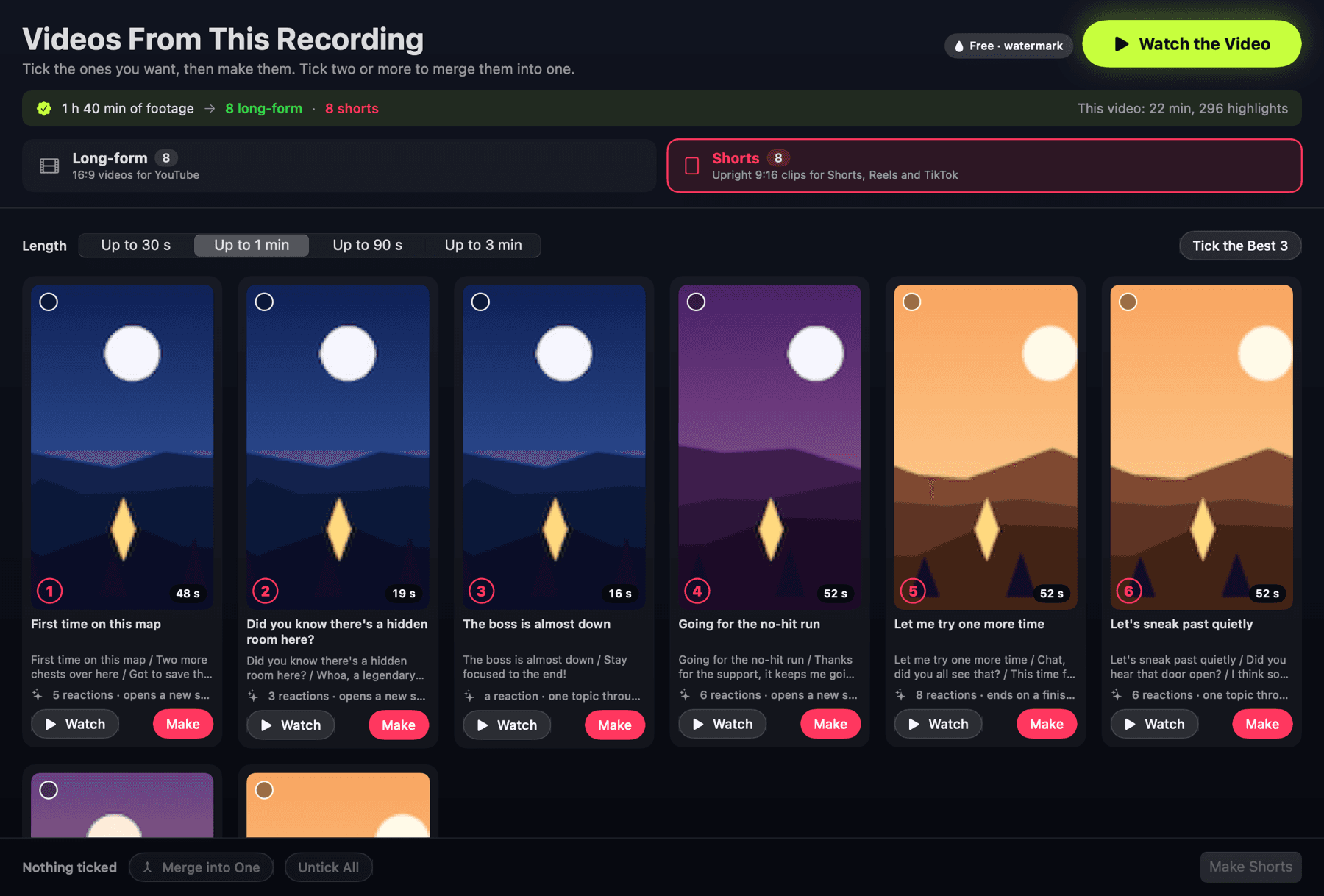
A round, a talk topic, a part that is one thing. Each card says where it starts and ends, how lively it is and how it opens. Merge neighbours, rename them, or tick the recommended ones and make them in one go. Nothing becomes a file until you make it.
- Long-form: opens where a round or topic starts, closes where it ends, with its big reactions a minute beside it
- On every card, the words said inside: how it opens, the line at its peak; nothing invented
Open one large. Change it where you see it.
Pick a card and it opens large: a short in a phone frame, the way Reels and Shorts show it, a long video in a wide card. Click a caption to change its words, drag it to move it; the title, the progress bar and the picture work the same way. Beside it are the quick changes: caption look, font, key words, highlight colour, the shape of a short's picture, music, sound effects, intro and outro. What you see is what the export burns in.
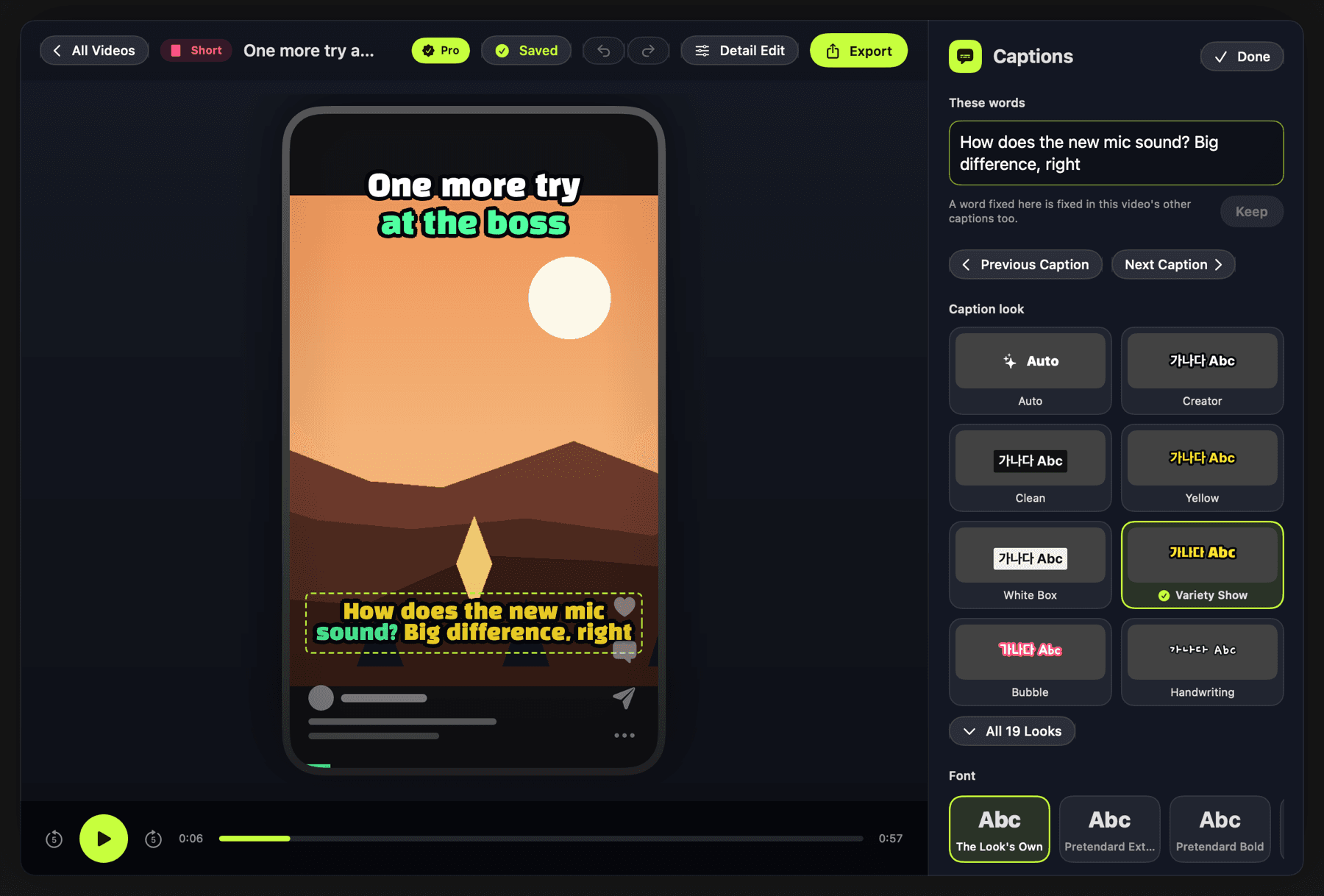
Captions with a look, not a default
19 looks, each with its own font and colours, drawn by the same engine that makes the video: variety-show yellow, bubble, neon, comic, impact. Word-by-word captions that follow the voice, the key word of each line in the accent colour, a hook title across the top and a progress bar for shorts. A Japanese or Chinese line keeps the look in a font of its own script.
Then the shorts, ready to make
Each short is one moment: the line that starts it, the peak, the reaction that ends it. The card shows its length, the line at its peak and why it was picked. Watch it, make it, tick several to make them in one go, or merge two into one short.
- Shorts: one moment from the recording, from the line that starts it through the peak to a finished reaction
How it works
Drop. Leave. Post.
Three steps, and the only decision that is yours: the kind of video. Everything else is the engine's job, and when it is unsure it falls back to a safe default.
Drop
Drag in the stream recording, the day's files or a whole folder. Several files are joined in the order they were shot.
Leave
Pick the kind of video: travel & vlog, food, gaming, talk or makeup. Press once. SwitchLog reads the whole recording, picks the moments, writes the captions with the voice separated from background sound, frames each shot for the shape of the video and finds the shorts. There is nothing to do while it is made. Every recording gives a long-form video and its shorts, and upright footage under three minutes becomes one short.
Post
The board shows every video and short the recording gives. Open one large, click a caption or the title to change it right there, and export. Nothing is asked until you want a file: Export brings up the plans, and no account is needed. The timeline editor is one press away if you want it. Post… writes a title, description and hashtags and opens YouTube's or TikTok's upload page.
Who it is for
On your own, as an editor, or as a team.
- Any creator
Start before you hire an editor.
Hours of footage wait for an edit, and an editing tool has to be learned first.SwitchLog asks one thing, the kind of video, then makes the long-form video and its shorts. There is nothing to do while it is made.You get a board to choose from, and you fix a video by clicking it: the caption, the title, the bar, the framing. It is free until you export, with no account even to subscribe.
- Shorts-first creator
Shorts without a timeline.
Making shorts means cropping, reframing and exporting each clip by hand.An upright clip under three minutes is made as one short. A short opens in a phone frame, as a 3:4 picture between bands or filled 9:16, and you drag the picture to choose what shows.Merge two shorts into one, or make several in one go. What the preview shows is what is exported.
- Editor · agency · MCN
Unreleased footage stays on the Mac.
Client footage cannot go to a cloud tool, and per-minute credits grow with every job.SwitchLog picks the moments, cuts and captions on the Mac at a flat price, then sends the cut to Final Cut Pro, DaVinci Resolve or Premiere Pro, with the captions as SRT.You start from a cut, not from raw footage. For a team there is an organisation's plan, by contract.
The more you use it, the more your Mac works, instead of the more credits you buy.
Five genres, each with its own rules
Each genre has its own selection profile and caption style. They are kept apart, never averaged.
- Travel & Vlog
A day of travel is many clips from more than one camera, with long stretches where nobody speaks.SwitchLog puts the files in order and matches the cameras, keeps the view, the arrival and the shape of the day, and can write scene captions where nobody speaks (an optional language model, downloaded when you accept, run on the Mac).Drop the whole day at once. Once the models are there, it works on a laptop with no connection.
- Food (mukbang)
A meal on camera runs long, and the moments that matter are a few seconds each.SwitchLog finds the reactions and the verdicts, from the first bite on, and writes the captions in the big outlined style food creators use.The look is already there. Click a caption to change its words.
- Gaming
Hours of replay, with your voice under the game sound.SwitchLog makes the video from the reactions and the rounds and finds the shorts in it. It separates your voice from the game audio on the Mac before it transcribes, so captions survive loud scenes, and it can bleep swear words.A long stream with rounds or topics comes back as several long-form videos to pick from.
- Talk
A long talk has a few lively lines and a lot of air between them.SwitchLog keeps the liveliest lines and zooms in on the speaker's face at them. Name a speaker once and the name appears by voice in later videos.The topics of a long talk are offered as separate videos, so you pick instead of scrubbing.
- Makeup
The products are named out loud, and putting them on screen is a job of its own.SwitchLog keeps the product reveal and the finished look, and reads the product lines into product cards (the same optional language model, run on the Mac).The product cards come with the video; you do not type them in afterwards.
The economics of editing
Should editing more have to cost more?
Hand it to a person and every video has a price. Cloud AI spends credits and allowance the more you use it. With SwitchLog, the Mac you already own does the work.
- Hire a person
A price per video
The result is good. But each extra video is one more quote.
- Use cloud AI
Credits per minute
Every minute of footage you upload spends credits. The longer the footage, the faster they go.
- SwitchLog
The Mac you own does the work
Processing finishes inside your Mac. Hours of footage add no extra AI credits.
One hour of raw footage
What does one hour of footage cost in credits?
Each tool's own published credit policy, applied to 60 minutes of source video, side by side.
As of 2026.10, read from each company's official pricing or help page. Plans include different numbers of credits at different prices, and policies change. This compares credits, not money.
The other option is labor
A person does it well. But more videos mean more cost.
"If not AI, why not just hire an editor?" You can. But once shorts, a thumbnail and revisions join the long-form edit, one job can run to several hundred thousand won, and that cost grows with every video.
Public freelance listing example — not a market average
Example public freelance listings · Kmong
- Long-form cut (up to 10 min)Captions and music, 1 revision₩99,000
- Long-form edit + thumbnail (up to 10 min)Story edit and effects, 2 revisions₩219,000
- 1 short from a long video1 revision₩50,000
- 10 shorts from a long video2 revisions₩450,000
1 long-form edit with thumbnail + 10 shorts₩669,000
The same example, ordered a few times a month
Outsourced production example- 1× a month₩669,000
- 2× a month₩1,338,000
- 4× a month₩2,676,000
SwitchLog Pro$19.99 a month, however often
Individual sellers' listed prices on a Korean freelance market, read in 2026.10. Not a market average: prices vary widely by editor and scope. The totals on the right are this example multiplied by the count. Some videos still need an editor's hand; SwitchLog takes the repetitive work that comes before it.
Why it can be flat
Put in more hours. The price stays put.
Most AI editors upload your footage to their servers and spend credits on every minute their AI processes. SwitchLog's AI, from transcription and scene analysis to the cut itself, runs inside your Mac, so there is nothing to meter.
Your Mac already has the compute. Use it.
- Video usage ↑
- Credits / API / cloud compute ↑
- Video usage ↑
- Your Mac works more
This does not mean cloud AI is always the more expensive choice. SwitchLog avoids repeated per-use AI credit charges.
- $0AI usage fees and credits
- ∞Hours you can process
- 0Videos uploaded to a server
Three 3-hour streams a week is about 36 hours a month.
SwitchLog stays $19.99 a month
$0.56 per hour of footage
Nothing leaves your Mac. Not the footage, not the audio, not the captions.
The server confirms your subscription and delivers the models once. It signs you in and delivers a profile file only if you choose to sign in, and it receives usage events only if you said yes. The app holds no key beyond the server's address.
With Apple silicon, all of this now finishes inside a laptop.
Read the privacy policy →- Vision and speech models run locally; once they are downloaded, a video is made with no internet connection
- No account needed, even to subscribe: you pay with your Apple ID
- Usage data: asked once on first launch, nothing sent unless you say yes, and never a file, a path or a caption
Public user reports
Usage-based AI comes with a trade-off.
From public product reviews, as users report it.
- Public user report
Some users report additional credit usage when correcting or regenerating AI-generated results.
Individual user report. Some failed attempts were refunded after support review.
Trustpilot, OpusClip reviews · 2026.09 ↗
This is not about a competitor's weakness; it shows the economic trade-off of usage-based AI. It is not a statistic.
The real bottleneck
The bottleneck is not the cut. It is making the same decisions again.
Every video asks the same questions. Answering them again is where the hours go.
- Keep this scene?
- Cut here?
- This caption style?
- Zoom in?
- This sound effect?
- B-roll here?
SwitchLog Enterprise is being developed to keep those decisions in a Creator Profile.
Enterprise · Creator Profile roadmap
Not a pricing tier. A profile we build together.
Three phases that move a channel's editing decisions into a profile, each marked with where it stands today.
PHASE 1NOW
We learn with you.
REWYND builds the profile by hand from what the creator and the editing team send.
- Raw footage
- Final edits
- Assets
- Feedback
PHASE 2BUILDING
The system learns the pattern.
We are building the system to extract the editing patterns by itself.
- Keep / remove
- Cut timing
- Captions
- Asset usage
- Effects
- Pacing
PHASE 3RESEARCH
Every correction improves the profile.
We are researching a loop in which a person's corrections feed back into the profile.
- SwitchLog result
- Human correction
- Profile update
- Next edit needs fewer corrections
Automatic fine-tuning is not offered yet. The BUILDING and RESEARCH phases have no dates.
Where each tool fits
Not smarter. Built differently.
Every tool has work it suits. Instead of a feature checklist, here they are by cost structure and workflow.
Premiere Pro / DaVinci Resolve
- Best for
- Manual professional editing
- Trade-off
- Time and a learning curve
OpusClip / Vizard / Wisecut
- Best for
- Automated clipping in the cloud
- Trade-off
- Usage and credit limits
Descript
- Best for
- Text-based editing and AI workflow
- Trade-off
- Media hours and AI credits per plan
SwitchLog
- Best for
- A local-first workflow for creators who publish every week
- Strengths
- Local processing
- No raw footage upload
- No per-edit AI credits
- Long-form + shorts workflow
- Enterprise personalization roadmap
- Manual editingTime scales with output
- OutsourcingLabor cost scales with output
- Cloud AICredit and usage constraints often scale with usage
- SwitchLogLocal compute uses the Mac you already own
SwitchLog isn't designed to win a one-time price comparison. It's designed so repeated editing doesn't require repeated AI usage fees.
Based on each company's public materials as of 2026.10. Product names are trademarks of their owners.
If SwitchLog saves even one outsourced edit or a few hours of repetitive editing, the subscription can pay for itself.
We have not measured an average time saved, so we promise no number. It is free until you export: check it on your own footage.
Pricing
Free until you export
Run the whole edit on your own footage and watch the watermarked preview. Pay only when you export.
Creator Profile Pilot
Pilot SwitchLog with your channel.
We are looking for our first Creator Profile Pilot partners. Write to us with the channel, the genre and the hours you publish a week.
- YouTubers
- Professional editors
- MCNs
- Creator agencies
- Media teams
FAQ
Questions people ask first
Why are there no credits or minute limits?
Because the AI runs on your Mac, not on our servers. Other AI editors upload your footage, process it on their servers and charge credits for that cost. SwitchLog's transcription, scene analysis and cut all run on your Mac, so an extra hour costs us nothing, and Pro stays one flat price however many hours you put in.
What do I need?
A Mac with Apple silicon on macOS 14 or later. On first launch SwitchLog downloads the models it needs, once: five models, about 3 GB. On Macs with 16 GB of memory or more it may offer one more model (2.9 GB) when you make a travel or makeup video, for scene captions and product cards; you can make the video without it.
Is anything uploaded?
No. Analysis, transcription and rendering run on your Mac, and once the models are downloaded a video is made with no internet connection. The server sees your subscription state, and a sign-in only if you choose to sign in. On first launch the app asks once whether to share anonymous usage data; nothing is sent unless you say yes, and never footage, file names or captions. The privacy policy has the details.
Does it run on Windows?
Not yet. Today it needs a Mac with Apple silicon on macOS 14 or later. A Windows version for PCs with NVIDIA graphics, running the same engine, is planned; there is no date yet.
$0 AI usage fees and credits∞ Hours you can process0 Videos uploaded to a server
Be first on the Mac App Store
Leave your email and we write once, when SwitchLog ships. Nothing else.